Microsoft Teams to Get Apple CarPlay Support, Call Transfer Feature
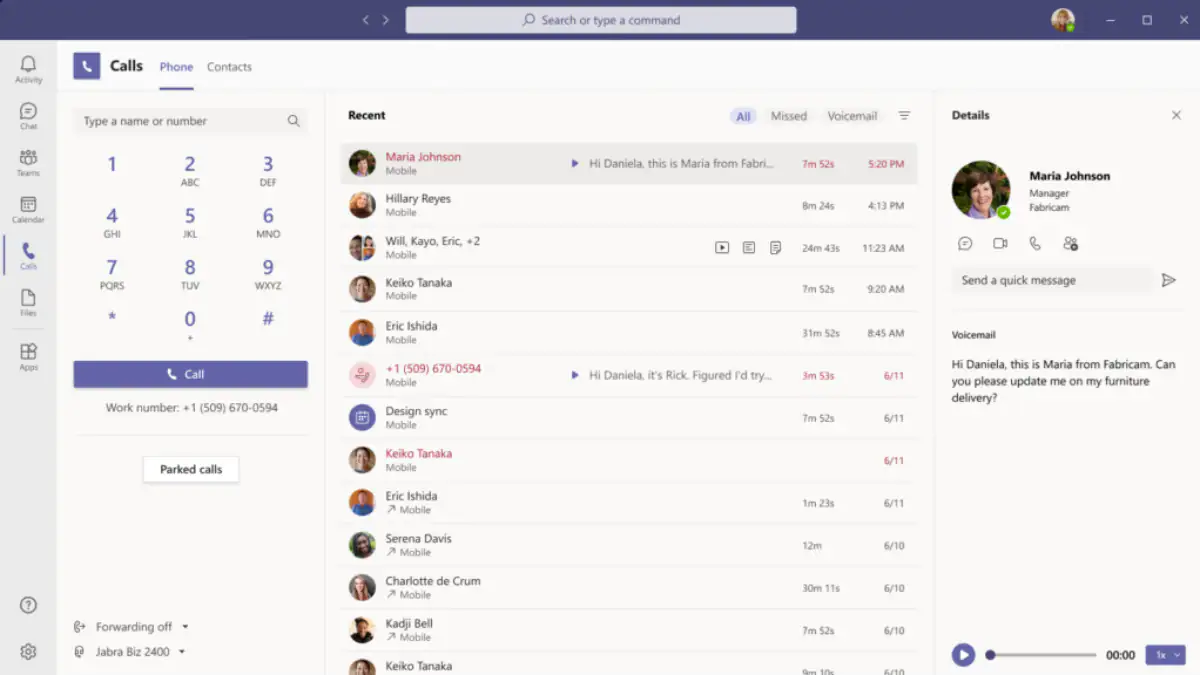
Microsoft Teams is getting an overhaul with new features like call transfer between desktop and mobile, and Apple CarPlay support. Microsoft announced that Teams will now offer a more streamlined calling experience. It added that people will be able to shift their calls between their mobile and desktop starting early 2021. Apple CarPlay support will allow people to use their vehicle’s built-in controls and Siri to place and answer calls.
According to a blogpost by Microsoft, the Microsoft Teams enhancements are rolling out for business and non-business customers. Firstly, the app is getting important calling elements — the dial pad, call history, voicemail, contacts, and settings into a single location that will allow users to quickly shuffle their contacts and easily place calls.
Those using Microsoft Teams on their desktops as well as on phones will be able to transfer their calls from a desktop endpoint to a smartphone starting early 2021. Moreover, users can now combine multiple calls through the Call Merge feature, which is now available for both PSTN calls and VoIP calls.
Furthermore, starting in early 2021, users will be able to adjust settings in Microsoft Teams to cap the amount of data that will be used during video calls. So in case you’re in an area that offers poor connectivity, you can choose low data mode to make a call. Microsoft is also extending CarPlay support that will allow users to place and receive calls in the car using the vehicle’s built-in controls. They can also use Siri to place and answer calls.
Microsoft Teams to also have Spam Identification feature
Photo Credit: Microsoft
Other features include Spam Identification in which Microsoft Teams will identify potential spam calls. Furthermore, there is an automatic reverse number look-up feature wherein users will be able to see the name of the caller when they receive a call as well as in their activity feed and voicemail. Teams users will also be able to save call recordings in OneDrive and SharePoint.


