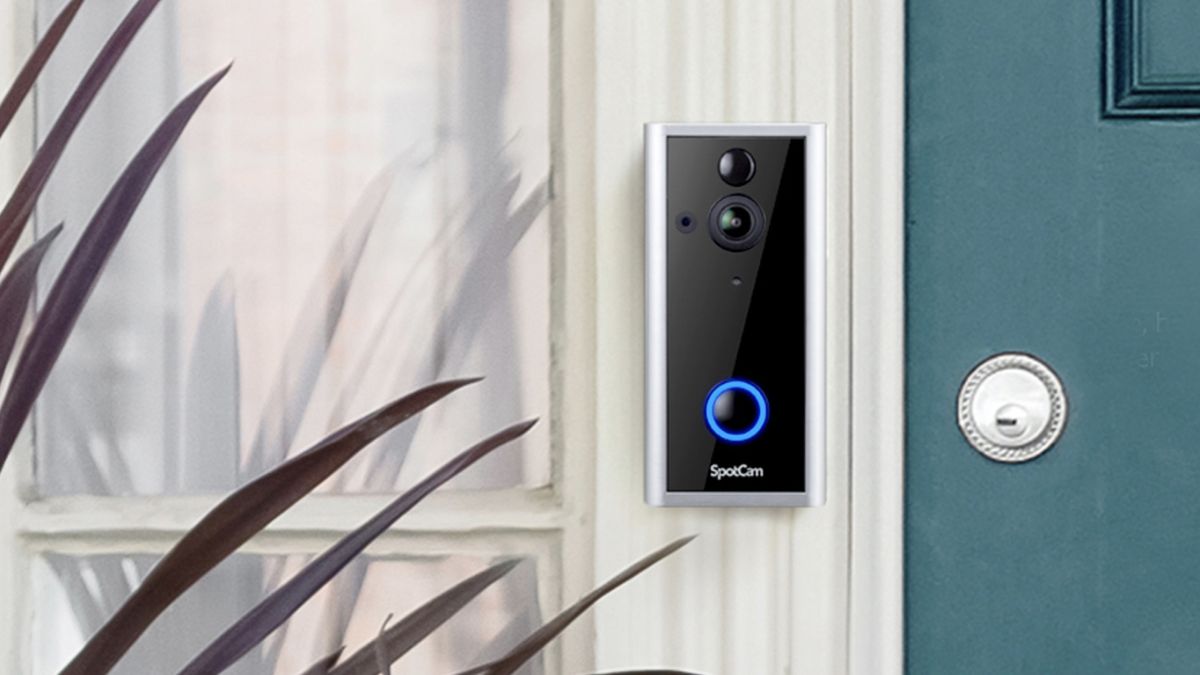
Size: 2.7 x 5.7 x 1.5 inches (including wall mount) Video resolution: 1920 x 1080 Field of view: 180 degrees (hor) Wireless: 802.11b/g/n (2.4GHz) Weather resistance: IP65 (designed for indoor and outdoor use) Operating temperature: -22 to 122 degrees F Power requirements: Hardwire requires 24VAC or DC5V2A wire. Also runs on rechargeable lithium-ion battery
This video doorbell is versatile and includes some impressive features, but some elements of the interface could be more clearly designed. You also need to upgrade for face recognition features.
The Spotcam Video Doorbell 2 offers lots of useful features and services to compete in an increasingly competitive video doorbell market. For example, it’s compatible with Amazon Alexa, Google Assistant, IFTTT and more. It also has very good quality 1080p video, which is what most video doorbells capture. But I found the app’s interface and design not as intuitive as I would like, and it lacks two-factor authentication. Read what else we liked and didn’t like in our SpotCam Video Doorbell 2 review.
SpotCam Video Doorbell 2: Price and availability
The SpotCam Video Doorbell 2 came out this past January 2021 for $149, although you can now buy it online for $99, which makes it among the less expensive models on the market.
Like many other video doorbells, the SpotCam Video Doorbell 2 offers several cloud storage options to store and review video clips, among other assets. For all four services, you get instant alerts, can stream video and audio and have live view access to your clips. You can also share and download those videos. The main difference is the amount of time you can keep your videos stored in your account. (Note: The company says the video is encrypted.)
SpotCam Video Doorbell 2 is capable of including facial recognition and artificial intelligence features (AI), but you’ll need an additional subscription — or more accurately, subscriptions, since you can choose the types of AI services you want to use, which include the following:
Face recognition: $9.95 per month or $99 per year
Human detection: $5.95 per month or $59 per year
Missing object: $3.95 per month or $39 per year
Or you could subscribe to two service packs, each for $9.99 per month or $99 per year, that include four services. Each pack includes human detection, missing object and virtual fence services, plus one additional service:
SpotCam Video Doorbell 2: Installation and power options
Overall, the SpotCam Video Doorbell 2 was quite easy to set up and install. My house, which was owned by my grandfather and built in the 1940s, originally included a hardwired doorbell to a chime. But we replaced those years ago with a battery-powered, wireless doorbell. So, I was glad to see that this doorbell actually provides you with options for either hardwired power or battery power. For my tests, I relied on charging up the lithium-ion battery, which worked perfectly. (The company claims the battery will last for up to six months on one full change.)
The Doorbell ships with a chime speaker, a wall mount kit, doorbell power adapter, a USB power cable (for charging the battery), waterproof rubber stickers, a quick start guide and a Spotcam user manual. I was happy to see that the kit came with both printed quick-start guides and a manual. SpotCam has additional info on its website, but it’s not always easy to locate the info you want on their website.
(Image credit: Tom’s Guide)
You’ll need to download the SpotCam app, and then set it up—with a username and password. You’ll also need to input an email in order for them to send you an email verification for the Spotcam account. That all worked as expected. You should note that the service only connects to Wi-Fi using 2.4Ghz Wi-Fi. Still, it was easy to pair both my iPhone 12 and my Android phone (a Google Pixel 3a) with the unit. Be sure that your phone or tablet and the doorbell are on the same Wi-Fi network when pairing and using the system. It has Bluetooth, which made the setup quite easy.
Like many such doorbells, this SpotCam generates real-time alerts for a variety of reasons, from ringing the doorbell to the fact that the camera detected motion. You’ll need to go into the settings section of the app and figure out what types of alerts you’d like to receive: You can set the app to send you alerts when it just detects motion, or for other events, such as doorbell pressed, low battery, etc.
SpotCam Video Doorbell 2: Design and interface
I had no issues with the design of the doorbell itself, although it is a tad larger than most of the larger-sized models. I also liked that it has an IP65 waterproof rating, approved for both inside and outdoor use.
But I wasn’t as happy with how the interface is designed. Whether I was using the app (available for either iOS or Android) or a web browser (which, annoyingly, isn’t compatible on all web browsers), I found the icons were a little hard to see. Also, the icons weren’t always labeled. Now, the icons are described in the user manual and a quick start guide, but it was hard to make some of them out on the screen. Additionally, the app crashed more than once on my iPhone.
(Image credit: Tom’s Guide)
The SpotCam Video Doorbell 2 lets you store video files on a micro memory card. However, it’s one of the strangest memory-card slots I’ve ever encountered in many years of testing all sorts of digital imaging devices. In fact, I needed to contact the company to figure out how to install a memory card. What’s more, once I transferred the video clips to my laptop, I was unable to play those clips. It was much easier to download them from the My Film section of the app and web interface, which formats them into .mp4 video files.
SpotCam Video Doorbell 2: Video and audio quality
The SpotCam captures full HD-resolution 1080P video (streaming and recording) up to 30 frames per second (FPS). The pano view gives you a very wide, 180-degree horizontal view, which not surprisingly makes it appear somewhat distorted, but it’s a clear field of vision.
The camera’s night vision setting does illuminate objects and subjects, although most of the color and some detail is diminished.
(Image credit: Tom’s Guide)
In my sample test shots, I thought it did a very good job in shooting images and video with good color fidelity and saturation. However, in order to make the image sharp, the video has some chromatic aberrations — you’ll see some purple fringing in the video, particularly at the edges of the image. There were also what appear to be artifacts, due to compression of the video. Nevertheless, it does a good job of being able to identify various subjects and objects in the video. By and large, the video clips are a bit choppy, but they’re decent for identifying subjects.
Daylight (Image credit: Tom’s Guide)
The audio on the video clips was decent. I could clearly hear what the subject was saying. It supports full-duplex audio, so you can both hear and talk to each other at the same time. But you’ll want to adjust both the speaker volume and camera microphone in the app setting in order to get the best results.
Night (Image credit: Tom’s Guide)
Additionally, a Voice Message function lets you play a pre-recorded voice message when someone presses the doorbell but you’re not able to answer. A Voice Change function allows you to convert audio of a female voice to audio of a male voice (protecting the user’s privacy and increasing security).
SpotCam Video Doorbell 2: Security and privacy / Smart home compatibility
While the SpotCam does ask you to authenticate your email during the set-up process, it doesn’t include two-factor authentication for signing-in, which some other video doorbell makers, such as Ring, are now including to make the process more secure.
Normal light (Image credit: Tom’s Guide)
Additionally, the manufacturer says the SpotCam Video Doorbell 2 has the ability to work with several smart-home services, including Amazon Alexa, Google Home’s assistant, IFTTT and Conrad Connect, which would allow this video doorbell to be integrated within one of those smart-home ecosystems.
SpotCam Video Doorbell 2 review: Verdict
The SpotCam Video Doorbell 2 looks nice and provides very good quality video and audio when recording video clips. However, it comes up short in its design and implementation of some features. And although its cloud storage plan is pretty competitive, you need to subscribe to an additional service in order to take advantage of its facial recognition features.
Among the best video doorbells, at this price we prefer the Ring Video Doorbell (2nd gen), which can also be wired or run on battery power, has good quality video, two-factor authentication and fully encrypted video, and has an app that’s much easier to use.
Stay connected with us on social media platform for instant update click here to join our Twitter, & Facebook
Denial of responsibility!TechAzi is an automatic aggregator around the global media. All the content are available free on Internet. We have just arranged it in one platform for educational purpose only. In each content, the hyperlink to the primary source is specified. All trademarks belong to their rightful owners, all materials to their authors. If you are the owner of the content and do not want us to publish your materials on our website, please contact us by email – [email protected]. The content will be deleted within 24 hours.