The best Chromebook for your needs can be hard to find. Most Chromebooks have incredibly similar names (the Google Pixelbooks are the exception that makes the rule), and few have truly stand-out features. And that’s kind of the point at times: Chromebooks offer a minimalist alternative that has struck a chord. This is why we test them, to tell the difference between the excellent and rubbish Chromebooks, which often have similar prices.
Chromebooks are a popular choice for students and teachers, plus they’re ideal for anyone who is always online. Many provide amazing battery life, and most run Android apps thanks to Chrome OS support for the Google Play Store. Oh, and if you’re unfamiliar with Chrome OS, it’s easy to get used to, as it’s an extremely lightweight alternative to Windows 10 and macOS.
Don’t think Chromebooks are just for kids, though: the new Intel Evo brand for high-performing laptops won’t just bring reliable performance to Windows, as it’s also going to be used to improve Chromebooks with the Project Athena brand as well. AMD’s also announced new Ryzen-based Chromebook processors, which (given its track record) should be hyper-competitive with new Intel chips.
Still, Chromebooks are much simpler to use than their PC and Mac counterparts. That’s mostly because they revolve around the Chrome browser. Everything you do on a Chromebook, unless you’re emulating Android apps or one of the experts running Linux on a Chromebook, will happen in a Chrome window.
All that being said, the best Chromebooks are great laptops. Many are convertibles, with touch screens that are ideal for Android apps (which are not as good when used with a mouse and keyboard alone). And while Chromebooks are mostly seen as devices for students, the category now includes multiple elegant models that are viable replacements for business laptops.
What are the best Chromebooks?
The Asus Chromebook Flip C434 is the best Chromebook overall for multiple reasons. For starters, it fits three major Chromebook standards: long battery life (nearly 10 hours), a rotating, convertible screen, and affordability when compared to PCs. Yes, it’s a little more expensive than other Chromebooks on this list, but how often do you find aluminum 2-in-1 PCs with long battery life and a great screen, at under $600? Other highlights include a colorful 14-inch full HD display and a premium metallic chassis.
Those on a budget should check out the Samsung Chromebook 4. It offers a premium metal lid, snappy performance from its Celeron processor and long battery life for under $250. And at 2.6 pounds, the Chromebook 4 is quite portable.the Dell Inspiron 11 Chromebook is the best option for kids and younger students. It offers decent performance, over 9 hours of battery life and a 2-in-1 design, plus an HDMI port for plugging the Chromebook into a TV.
The best Chromebooks you can buy today
1. Samsung Galaxy Chromebook 2
The best Chromebook overall
Specifications
CPU: Intel Celeron | Core i3 processors
RAM: 4GB, 8GB
Storage: 64GB, 128GB
Display: 13.3-inch QLED (1080p)
Dimensions: 12 x 8 x 0.6 inches
Weight: 2.7 pounds
Reasons to buy
+Beautiful design+Gorgeous QLED display+Improved battery life
Reasons to avoid
–Key travel could be better–Touchscreen input can be inconsistent
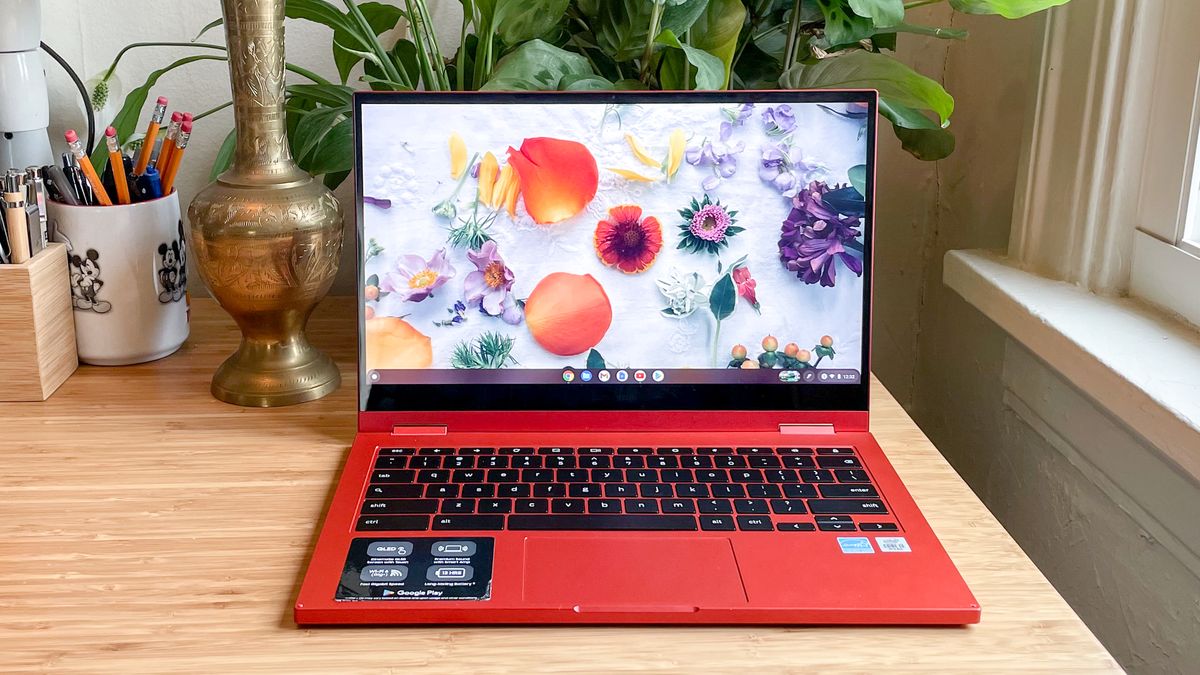
Taking away the Samsung Galaxy Chromebook’s 4K display was probably the best thing Samsung could have done to make this Chromebook a hit. Now it’s way more affordable, but still sports a great QLED display and longer battery life — 7:50 vs the previous gen’s 5:55. It’s also going to sound great, plus its Core i3 configuration provides a ton of speed for Chrome OS.
We weren’t as happy with the vertical travel in its keyboard, which is a bit shallow. This creates a slight learning curve you’ll adapt to over time. But to get a Chromebook that looks this good — wow that Fiesta Red color option stands out in a sea of silver Chromebooks and PCs. Plus, at $549 (Celeron) or $699 (Core i3), the Galaxy Chromebook 2 is a pretty good value. We like it so much that we awarded it best Chromebook in our Tom’s Guide Awards 2021.
Read our full Samsung Galaxy Chromebook 2 review.
Samsung Chromebook 4 (Image credit: Tom’s Guide)
2. Samsung Chromebook 4
The best budget Chromebook
Specifications
CPU: Intel Celeron N4000
RAM: 4GB
Storage: 32GB
Display: 11.6-inch, 1366 x 768-pixel
Dimensions: 11.3 x 8 x 0.7 inches
Weight: 2.6 pounds
Reasons to buy
+Long battery life+Thinner and lighter than competitors+Decent performance
Reasons to avoid
–Dim display without touch–Mediocre audio
The best Chromebook for those on a budget, the Samsung Chromebook 4 really impresses with its battery life. This laptop lasted for more than 10.5 hours of web browsing on a single charge. The Chromebook 4’s aluminum top makes it look like a much more expensive computer — though it has a plastic base. This Chromebook’s performance is another highlight, enabling much faster multitasking than I expect at this price.
The Chromebook 4 is also lighter and thinner than competing 11.6-inch Chromebooks, though we wish its display supported touch input and that its screen could rotate. Its screen is acceptable for plowing through work, but don’t expect to see colors pop or a lot of detail when watching movies or bingeing on YouTube. The speakers are okay, but you may want to supply your own headphones.
+Lengthy battery life+Excellent screen for its price+Affordable, plus keyboard included
Reasons to avoid
–Keyboard is best for small hands–Hinge could be stronger
Sometimes, it’s amazing how much you can get for $300 or less. The Lenovo Chromebook Duet, for example, is a 2-in-1 Chromebook that offers something Microsoft’s Surfaces and Apple’s iPads won’t: it’s keyboard is included by default. Not only do you get that value, but the Chromebook Duet’s tablet display is excellent in its own right, with a surprising amount of color output and a crisp 1920 x 1200-pixel resolution. It’s so good it won the award for best budget laptop in our Tom’s Guide Awards 2021.
Smaller hands may find the Chromebook Duet’s keyboard a little on the tight side, but at this price, any keyboard is a surprise and a steal. Making things even better, the Chromebook Duet features ChromeOS tablet optimizations that are long overdue to take advantage of all of its screen space. On top of all of that? It lasted for 12 hours and 47 minutes, nearly 13 hours.
Read our full Lenovo Chromebook Duet review.
(Image credit: Tom’s Guide)
5. Acer Chromebook Spin 713
The best 2-in-1 Chromebook
Specifications
Display: 13.5-inch, 2256×1504
CPU: Intel Core i5-10210U
GPU: Intel UHD
RAM: 8GB
Storage: 128GB SSD
Size: 11.8 x 9.3 x 0.7 inches
Weight: 3.0 pounds
Reasons to buy
+Great battery life+Affordable+Bright and colorful display+Amazing performance
Reasons to avoid
–Mediocre speakers–Small-sized keyboard
When it comes to finding a great Chromebook, you are always looking for an affordable (enough) mix of performance, design and endurance. That’s due in part to its Intel Core i5-10210U CPU, which provides a ton of speed for Chrome OS (anything more would be overkill), and 8GB of RAM for managing all the Chrome tabs you can throw at it.
Plus, its sharp 2256 x 1504-pixel screen provides bright and vibrant picture output. On top of that, it lasted 11 hours and 54 minutes on our web-browsing based battery test. The only major issue you could have with the Spin 713 is its size, but that’s going to be an issue for all 13-inch laptops. We like it so much we gave it a recommendation for best Chromebook in our Tom’s Guide Awards 2021.
A top-seller, with fantastic battery life, the Acer Chromebook R 11 is one of the best Chromebooks for the money. It gives you the standards — convertible hinge, touch screen and Android app emulation — and then adds a surprisingly colorful screen, with a 73.2% sRGB spectrum rating that beats many budget laptops. Make sure you’re buying the 4GB of RAM model, as it packs surprisingly good performance for this price.
Acer also sells a non-rotatable version of the R11, for $199, which might be right for those who don’t use Android apps, and can get away with just the Chrome browser. The R 11’s comfortable keyboard is another selling point for jamming on documents and emails. Just don’t expect it to look that sharp when you’re making any video conference calls, as this laptop’s webcam is not great.
After Google hit a home run with the super premium Pixelbook, the company returned with one of the best Chromebooks ever, the Pixelbook Go. More affordably priced (but still on the high-end of this list) this Chromebook is a case-study in why it can be worth it to spend more and invest in your next laptop.
Not only is this Chromebook elegant, with a slim chassis and grippy ribbed underside, but it’s got a great screen that’s brighter (368 nits) and more colorful (108% sRGB rating) than most screens. Plus, the Pixelbook Go has a great, clicky keyboard that enables comfortable typing. On top of that, it lasted nearly 11.5 hours on a single charge. The only real knocks against the Pixelbook Go are its lack of a USB-A port and how it’s not a convertible. That being said, those who can afford the Pixelbook Go will love it.
Read our full Google Pixelbook Go review.
(Image credit: Tom’s Guide)
8. Samsung Galaxy Chromebook
The best looking Chromebook
Specifications
Price: $999 (starting) $1,299 (as tested)
CPU: 10th Gen Intel Core i5
Graphics: Integrated Intel UHD
RAM: 8GB
Storage: 256GB
Display: 13.3-inch, 4K AMOLED
Battery: 5:55 (tested)
Size: 11.9 x 8 x 0.4 inches
Weight: 2.3 pounds
Reasons to buy
+Gorgeous red design+Speedy performance+Bright and vibrant 4K screen
Reasons to avoid
–Low battery life, even for a 4K laptop–Hinge should be stronger–Gets a bit warm
It might not have the battery life you expect from a Chromebook, but that can be excused when you take a look at how the Samsung Galaxy Chromebook breaks so many of the other typical rules of what a Chromebook should be. Its Fiesta Red chassis goes beyond eye-catching and hits drool inducing before you can say “wow that’s a Chromebook?” It even comes with Samsung’s S-Pen stylus, which is best used in tablet mode.
Its Core i5 CPU is so fast I watched four 1080p YouTube videos on it, without any stutter, just to see if I could. Oh, and it’s crazy thin and light, competing on size and weight with the MacBook Air and the Dell XPS 13. Its best feature, though, is its gorgeous 4K AMOLED display that makes colors pop and offers bright hues. It’s so great that it reminds us that Netflix needs to add Chrome support for 4K video.
If performance is your priority — and you want to have all the tabs open, and save a ton of files locally — then the Lenovo Yoga Chromebook C630 is the best Chromebook for your power-user needs. Its Intel Core i5-8250 processor provides great speed, and its 8GB of RAM will enable you to keep all the tabs you need open, without having to worry about your system getting bogged down.
Also, this laptop sports an aluminum chassis that’s really refined, and its big 15.6-inch screen will be great for binge-watching YouTube, Netflix and everything else you could need. The Yoga Chromebook C630 also provides a great port assortment, with 2 USB-C ports and 1 legacy USB-A port. That means you’re less reliant on port-expanding hubs that are a nuisance to remember to carry around. If only it didn’t cost so much.
–Dim, low-resolution screen–No USB 3.0 Type-A port
The Acer Chromebook Spin 311’s solid battery life and great keyboard help it stand out in a market overflowing with small, budget-friendly Chromebooks. It’s good enough to win a recommendation for best budget laptop in our Tom’s Guide Awards 2021.
With 1.6mm of travel distance the Spin 311’s keys are surprisingly comfortable to type on for extended periods, and the battery held up for nearly twelve hours in our tests, making this a great choice for kids, students, and anyone in the market for a cheap 2-in-1 Chromebook to get some writing done.
Anyone else may want to look elsewhere though, as the Acer Chromebook Spin 311’s 11.6-inch, 1366 x 768 display tends to leave videos looking washed-out and dim.
Read our full Acer Chromebook Spin 311 review here.
How to choose the best Chromebook for you
Finding the best Chromebook these days begins with a simple question: do you need a touchscreen? An increasing number of Chromebooks offer 2-in-1 designs with a touchscreen, allowing you to use Android apps from the Google Play store. However, those systems tend to be on the pricier side. If you want just a basic laptop on the cheap, a Chromebook without a touchscreen is the way to go.
As for screen size, an 11-inch display is good for younger kids, but a 13-inch display is better for older students and business users on the move. If you want a Chromebook as a primary home laptop, we would opt for a 14-inch or 15-inch display..
Then, think about performance. Are you buying this for a kid who’s got modest needs? A Pentium or Celeron processor should be enough. A Core M or Core i5 CPU is better for those who want more performance. Most budget Chromebooks start with 4GB of RAM, but we would get 8GB or more if you plan to work with a lot of tabs open. Because Chromebooks rely on the cloud, local storage isn’t that important, which is why 32GB tends to be standard. You’ll find 64GG to 128GB on more premium models.
Stay connected with us on social media platform for instant update click here to join our Twitter, & Facebook
Denial of responsibility!TechAzi is an automatic aggregator around the global media. All the content are available free on Internet. We have just arranged it in one platform for educational purpose only. In each content, the hyperlink to the primary source is specified. All trademarks belong to their rightful owners, all materials to their authors. If you are the owner of the content and do not want us to publish your materials on our website, please contact us by email – [email protected]. The content will be deleted within 24 hours.