WhatsApp Now Lets You Join a Ongoing Group Call After It Began
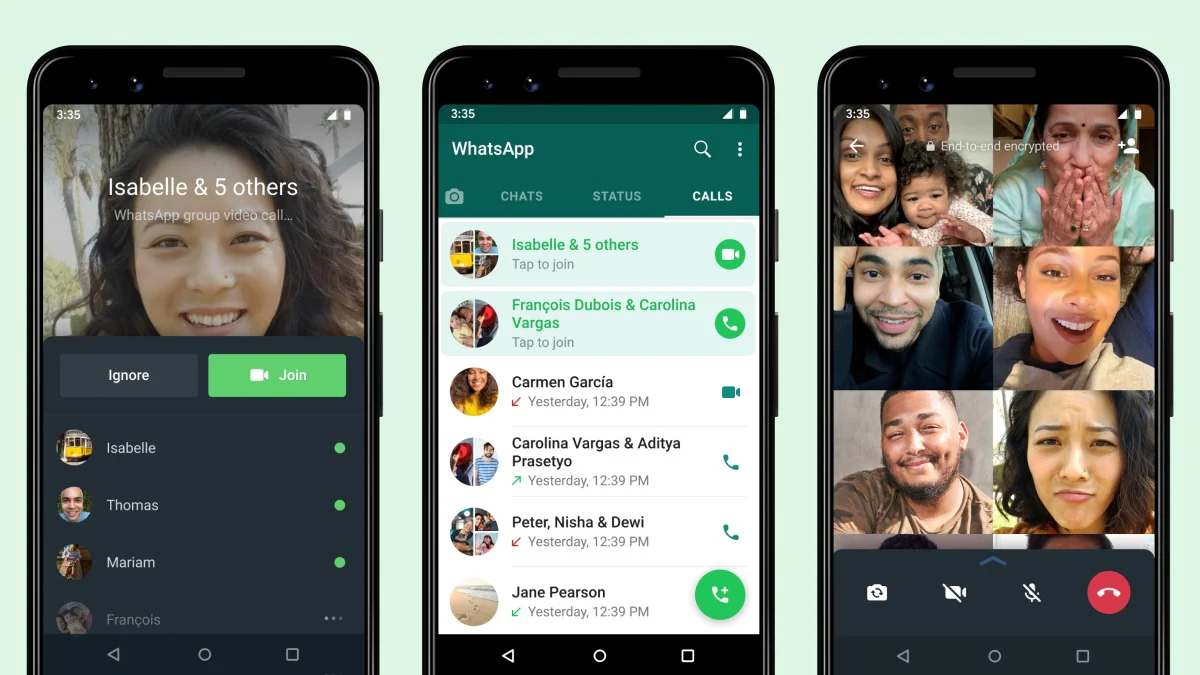
WhatsApp on Monday started rolling out joinable group calls to let users join a group video or voice call after it’s started and was missed initially. This will help users join a group call even if they initially miss a call when their phone rings. The update also brings an easy way to let you drop-off and rejoin a group WhatsApp call — as long as the call is still ongoing. Up until now, WhatsApp users were not given a native option to join a group call. However, participants in an active call could add members during a voice or video call on the platform.
Joinable calls reduce the burden of answering a group call as it starts and bring the spontaneity and ease of in-person conversations to group calling on WhatsApp, the Facebook-owned company said in a blog post.
How to join a missed group call on WhatsApp
You will see a Tap to join option in the call log on WhatsApp to join an ongoing group call even if it was missed originally. All you need to do is to just hit that option to join the call.
WhatsApp has also created a new call info screen that will allow users to see who all have been invited for the conversation but not yet joined. You can also look at the active participants of the call from the call info screen instead of getting their details after joining the call. Furthermore, the call info screen has an Ignore button to let you ignore a call and join it later from the Calls tab in WhatsApp.
Last week, WhatsApp was spotted testing joinable calls on the platform. WhatsApp for iOS beta version 2.21.140.11 carried the new experience for iPhone users. It also included the call screen that looked similar to Apple’s FaceTime interface.
Shortly after the iOS release, WhatsApp brought joinable calls to beta testers on Android. The overall experience looks similar on both iOS and Android versions.


