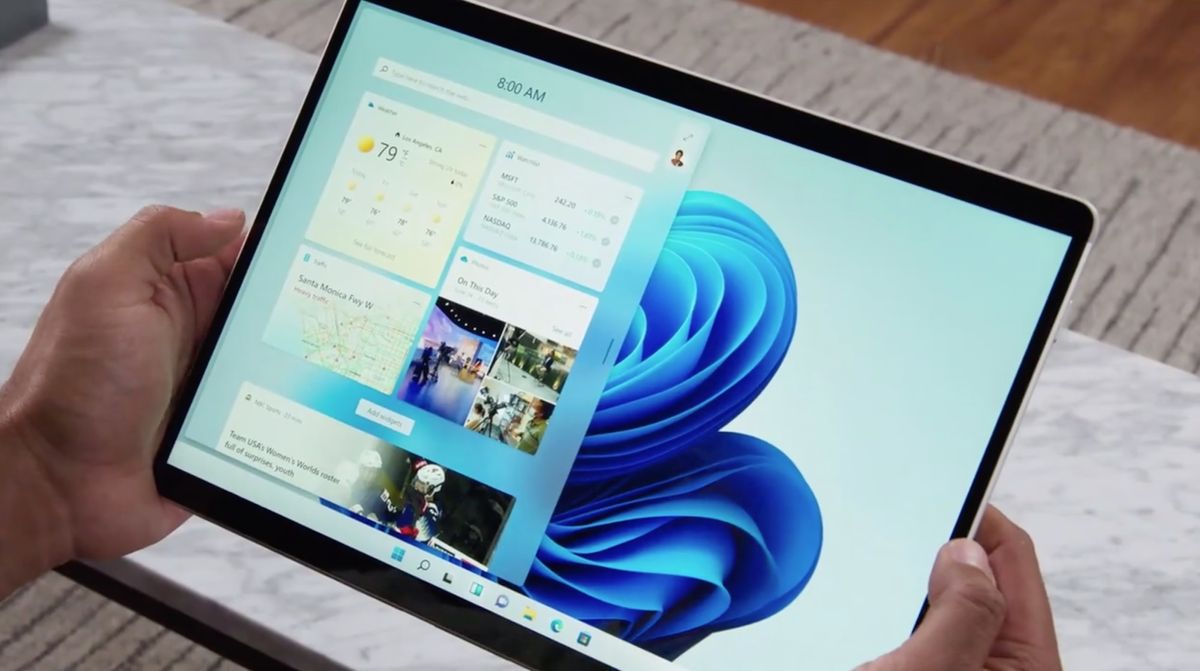
Microsoft has unveiled Windows 11, which features a big redesign along with lots of new features. Windows 11 switches up its look with a new Start menu and rounded corners, but it also includes lots of productivity upgrades, including Snap Layouts for running multiple apps at once.
Windows 11 also features new widgets for keeping you up to date with the latest news, Microsoft Teams integration and a new Windows Store. Plus, Windows 11 can run Android apps.
Gamers will appreciate the addition of Auto HDR for improved visuals, as well as faster performance for Direct Storage-supported PCs. And business users will love being able to undock and dock again without losing their place.
Here’s everything you need to know about Windows 11.
Windows 11 release date, price and beta
Windows 11 is coming out later this year, around the holiday season. Microsoft says it will be available as a free upgrade if you’ve got a Windows 10 PC, and new PCs with Windows 11 pre-installed will show up in time for the holidays, too
You can check if your PC is eligible for the free Windows 11 upgrade by going to Windows.com and downloading the PC Health Check app. Some users won’t be waiting until the year’s end to get their first crack at Windows 11.
Microsoft plans to roll out an early build of the software update to its Windows Insider Program next week. This won’t be a complete build with all the Windows 11 features, though.
Windows 11 design: New design and Start menu
(Image credit: Microsoft )
Windows 11 has a new look and feel that’s designed to be more attractive but also more user-friendly. There’s a new Start button that’s placed at the center, and pressing it can show you your recent files, docs and apps.
The overall goal is to get to where you want to go faster. The new Windows 11 also includes more rounded corners on apps to make it look fresher, and a streamlined taskbar. There’s also new colors and transitions, and a new dark mode that makes content stand out.
Windows 11 Snap Layouts, Snap Groups and docking
(Image credit: Microsoft)
Windows 11 now features Snap Layouts. You can pick the Snap Layout that you want to choose so you can run multiple apps at the same time. For example, you could have two apps side by side or three in columns or four in a grid, and there’s six choices in total.
If you sometimes feel a little lost after having to respond to a notification, Windows 11 includes a new Snap Groups feature in the taskbar. So you can get right back to what you were doing before you had to answer that message.
The same thing applies to the new docking appearance. Say you have to go to a meeting and then re-connect to a dock. All of your Windows will re-appear the way before.
(Image credit: Microsoft )
Windows 11 offers a whole new selection of Widgets, which is powered by Microsoft Edge and AI. These widgets can help you check your calendar at a glance, the weather, news, your to-do list, photos and more.
Widgets bring you a feed of info you can personalize, and you can decide how you want it to appear on your desktop. You can have Widgets slide out for the side or reside on your desktop at all times.
Windows 11: Better touch, pen and voice support
(Image credit: Microsoft)
Windows 11 contains a number of tweaks to input, particularly when it comes to touch. For example, there’s more space between icons in the touchbar, making it easier to tap the right thing. To that end, Microsoft is also adding bigger touch targets while inserting visual cues aimed at helping you more easily resize and move windows.
The onscreen keyboard is both redesigned and customizable. If you happen to use a pen or stylus to interact with your Windows 11 machine, you can expect improve haptics that sound and feel like you’re using an actual pen.
Windows 11 also features enhanced voice recognition for text input with Microsoft promising more accurate voice-to-text transcription and automatic punctuation. Voice commands are supported as well, such as “delete that” when you’re in a document.
Windows 11 desktops
(Image credit: Microsoft)
Windows 11 now lets you personalize different desktops with their own wallpapers. So you can have a desktop for work, home, school or gaming, each with their own apps and look and feel.
Windows 11: New Windows Store and Android Apps
(Image credit: Microsoft)
With Windows 11, Microsoft is redesigning the Microsoft Store, making it faster and easier to find the apps you’re looking for. That’s all well and good, but the announcement that will probably garner the most attention is that Android apps will be directly available for Windows 11.
Later this year, Microsoft says that you’ll be able to find Android apps in Microsoft’s Store and download them through the Amazon Appstore. The process sounds a little convoluted at this point, but Microsoft is promising to reveal more information on the experience in the coming months.
Windows 11 gaming: Auto HDR and DirectStorage
(Image credit: Microsoft)
Gaming has always been a big part of Windows, so that’s obviously continuing with Windows 11. Microsoft is introducing some new features specifically aimed at improving the gaming experience in its operating system.
Specifically, Auto HDR is coming to Windows 11, bringing improved contrast and color output without requiring app makers to reconfigure their games. During the Windows 11 launch event, Microsoft showed off a split screen of Skyrim — one half of the game appeared in SDR and the other in the new Auto HDR. The Auto HDR image was much brighter and featured greater detail.
Windows 11 also adds a direct storage API. If you’ve already used an Xbox Series X or Series S — both of which feature direct storage — you’ll notice how fast load times improve.
Finally, Xbox Game Pass, Microsoft’s gaming subscription service, will be built right into Windows 11 via the Xbox app.
Windows 11: Teams integration
(Image credit: Microsoft)
Microsoft is attempting to make Teams much more mainstream by integrating it directly into Windows 11. Chat from Microsoft Teams lets you connect through video calls but also test or voice. And it will work across Windows, Android and iOS (unlike FaceTime). You can also start presenting directly from the taskbar.
Windows 11 outlook
Overall, Windows 11 doesn’t necessarily feel like a reinvention of Windows, but it certainly seems like a bigger leap for productivity and for entertainment (especially gaming) than macOS Monterey. We especially like the new multitasking features and the new Start menu. Stay tuned for our hands-on impressions of Windows 11.
Stay connected with us on social media platform for instant update click here to join our Twitter, & Facebook
Denial of responsibility! TechAzi is an automatic aggregator around the global media. All the content are available free on Internet. We have just arranged it in one platform for educational purpose only. In each content, the hyperlink to the primary source is specified. All trademarks belong to their rightful owners, all materials to their authors. If you are the owner of the content and do not want us to publish your materials on our website, please contact us by email – [email protected]. The content will be deleted within 24 hours.