Contact UsDMCA policyAbout UsPrivacy PolicyTerms of UseDisclaimerCookie Policy
Trending

Windows 11: This is the one feature that will convince me to upgrade
Windows 11: This is the one feature that will convince me to upgrade

Windows 11 is not, I’ll admit, as exciting an upgrade as I’d hoped for. Windows 10 felt like it was rescuing us from the touchscreen-warped horrors of Windows 8, but in the absence of anything seriously wrong with the current OS, Windows 11 looks a lot more modest.

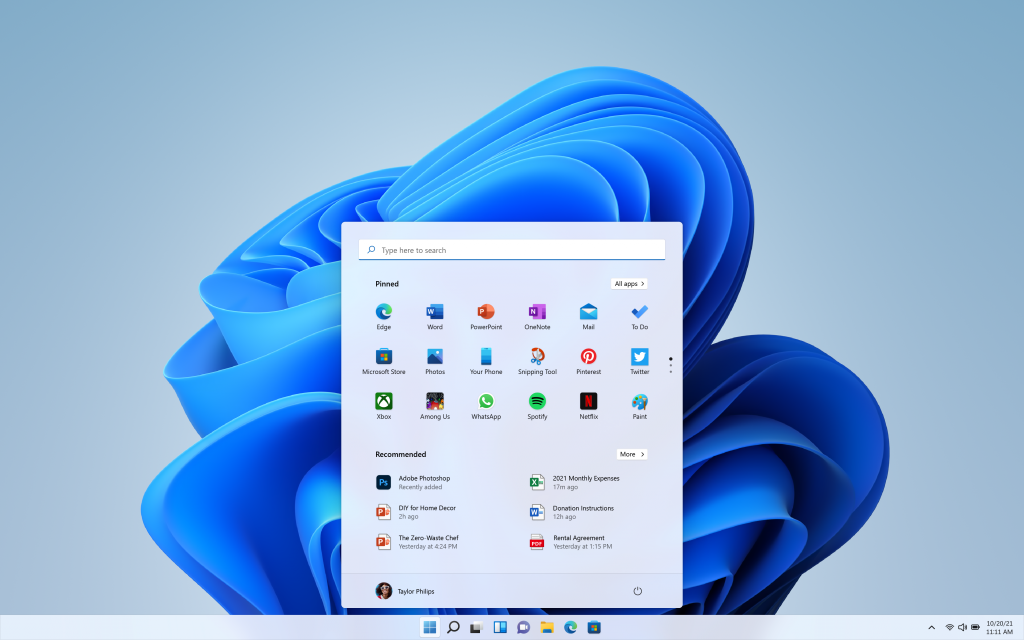
That said, there is one big change I’m looking forward to: the new Windows 11 Start Menu. For this alone, I’ll probably take advantage of my free upgrade from Windows 10 as soon as the finished version launches.

To truly understand why it’s worth getting hyped for a UI element, you first need to understand what’s wrong with the Windows 10 Start Menu. And to demonstrate, here’s a completely candid, no-changes-made screenshot of my own PC’s Start Menu:

(Image credit: Future)

I mean, just look at all that… nothing. I vaguely remember opting for as few Live Tiles as possible, but this just leaves digital acres of grey void. And of the tiles that remain, why are most of them even there? I haven’t used Microsoft Edge since I last installed Chrome, and there’s an “Xbox Console Companion” despite the minor detail that I have never owned an Xbox console in my life. I think the Blue app is on me — probably pinned by accident — but I don’t even know how to play Solitaire.


As such, 70% of the Windows 10 Start Menu is functionally useless to me. There’s nothing offensive about the alphabetical list of apps, but note how it cuts off once we barely reach the Bs. If I want to find an app that isn’t deemed worthy of being pinned to my taskbar, or has a desktop shortcut, it’s quicker to just start typing its name in the Search Bar than it is to scroll through.

The Windows 11 Start Menu, in my eyes, makes far better use of the space. Its single wisest move is to kill off Live Tiles entirely, leaving more room for pinned apps while simultaneously arranging them into a cleaner, more readable grid.

Windows 11 Start Menu - Full menu

(Image credit: Microsoft)

I suspect this will actively encourage me to make better use of app-pinning; while I have some work-critical software stuck to my taskbar, the ugly and unintuitive Windows 10 Start Menu never felt like an ideal alternative. 

In Windows 11, I’ll be able to build a much tidier 3 x 6 lineup of apps I use a lot, but which don’t quite merit a seat on the taskbar. I shouldn’t need to use Search or scroll through that alphabetical list as much, either.

Windows 11 Start Menu - Recommended apps

(Image credit: Microsoft)

Another new Start Menu feature, the Recommend grid of apps and individual files, is intriguing, too. It looks as if this presents recently opened items that aren’t currently pinned elsewhere, so could be handy for jumping back into a Word document or media-editing project that I’d previously left unfinished. In Windows 10, there’s also a “Recent files” section in File Explorer that gives me a similar form of quick access, but it makes sense to consolidate Recommended items with pinned apps under one “Stuff you probably want to open” umbrella.

The Start Menu might not be as overtly flashy an upgrade as some Windows 11 features, like its Auto HDR mode for games or its support for Android apps. But in terms of what I’d actually use every day, it could easily end up as one of the new OS’ most significant improvements.

Stay connected with us on social media platform for instant update click here to join our Twitter, & Facebook

We are now on Telegram. Click here to join our channel (@TechiUpdate) and stay updated with the latest Technology headlines.

For all the latest Technology News Click Here 

 For the latest news and updates, follow us on Google News. 

Read original article here

Denial of responsibility! TechAzi is an automatic aggregator around the global media. All the content are available free on Internet. We have just arranged it in one platform for educational purpose only. In each content, the hyperlink to the primary source is specified. All trademarks belong to their rightful owners, all materials to their authors. If you are the owner of the content and do not want us to publish your materials on our website, please contact us by email – [email protected]. The content will be deleted within 24 hours.

CategoryTechnology

Related News
